
Change SASSA SRD Banking Details
In this guide, I’ll show you step by step how to change your SASSA banking details the right way so your payments arrive on time without any issues.
You are not receiving SRD R370 payment in your bank account?
If you have entered the wrong banking details or choose the other payment method when applying for SRD grant. Now you want to submit new banking details, Worry not, the good news is you can change your SRD banking details to make sure your grant gets paid to the right account.
When you’re getting the SRD R350 grant, it’s important to keep your SASSA banking details updated to avoid payment delays.
SASSA Change Banking Details Online
As long as you’re using your own bank account and the phone number registered in your name for the SRD application, your payments will be received.
But if you have mistakenly used wrong banking information at application time, Now You can change it and provide the new bank account details.
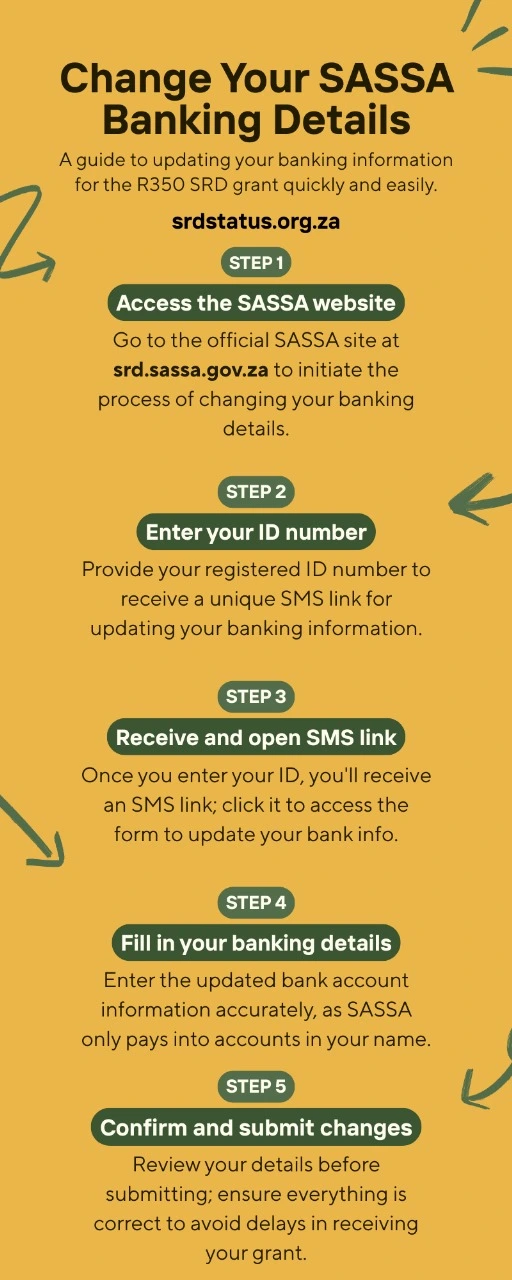
If you’re ready to update your SRD payment info, SASSA makes it possible to do this online. Here’s a quick guide on how to change your banking details through the official srd.sassa.gov.za website:
- Go to the official SASSA SRD website: https://srd.sassa.gov.za
- Scroll down to the section titled “How do I change my banking details?”
- Enter your South African ID number in the space provided.
- SASSA will send an SMS to your registered phone number with a secure link.
- Tap the link, and you’ll be taken to a page where you can update your banking info.
- Choose the option to receive payments via bank account, then fill in your details:
- Bank Name (select from the list)
- Account Number (make sure it’s correct!)
- Branch Code
- Account Type (either savings or cheque account). Read and accept the terms and conditions, then submit your new details.
SASSA Banking Details Link
If you’re trying to update your SASSA banking details, you’ll need access to a secure link. This link is how SASSA allows you to safely update where your grant is paid.
There are two types of links people usually refer to:
1. Official Website Link to Change Banking Details
- You can start the process by visiting the official SASSA website: https://srd.sassa.gov.za/said
- Scroll down to see the “How do I change my banking details?” section.
- Enter your South African ID number, and if your mobile number is registered correctly, SASSA will send you a secure SMS link.
2. The Unique SMS Link from SASSA
Once you’ve submitted your ID number, SASSA sends you a personal, one-time link to your registered cellphone number. This SMS contains a secure link that lets you:
- Update or correct your bank account info.
- Choose your preferred payment method (e.g. bank account or cash send).
- Enter your new account details.
Sometimes, you may not receive the SRD banking details link SMS for different reasons:
- Your phone number is not registered or correct.
- Your SIM card is no longer active.
- There’s a delay in the system.
SASSA Banking details update without Phone Number
If you’ve lost access to the phone number you used when applying for the SRD grant, you won’t be able to change your banking details right away.
That’s because SASSA sends a secure link via SMS to the registered number and without access to that number, you won’t receive the link needed to update your details.
Important: You cannot change your banking details without first getting the SMS link from SASSA and that link is only sent to the number they have on file. So, updating your phone number is the first and most important step if your number has changed or been lost.
SRD.SASSA.GOV.ZA Banking Details
If you need to change your SRD banking details, the process is done online through the official SRD website: srd.sassa.gov.za. This is where you submit or update your bank account information to make sure your 350 payment goes into the correct account.
Whether you’re updating due to a new account, wrong information, or switching from a SASSA card to a bank account, the whole process is handled at srd.sassa.gov.za the official channel for managing your SRD grant details.
Once you’ve submitted new details, SASSA first verify your bank account, which can take a few days. Payments will only be made once the account is verified. Be patient, you can check your status online to see if it’s updated.
Switch to TymeBank
TymeBank users sometimes get early access to funds and can get grant in advance from the bank with zero interest. Which is why TymeBank is a popular choice in SRD beneficiaries.
To change banking details to tymebank, Visit the same SRD website and enter your TymeBank account details. Make sure it’s your personal account.
How to change from SASSA card to Bank account?
If you want to switch your SASSA SRD grant payments from the SASSA card to your personal bank account, here’s exactly how to do it.
- Visit the SASSA Website
Go to https://srd.sassa.gov.za/said. - Scroll to “How do I change my banking details?”
You’ll see a section asking for your ID number. - Enter Your ID Number
Type your correct ID number and double-check before submitting. - Receive SMS with Secure Link
SASSA will send an SMS to your registered number containing a secure link. - If you no longer have access to that number, update your phone number first before continuing.
- Click the Secure Link
Tap the link in the SMS. it will take you to the page for updating your payment method - Follow On-Screen Instructions
Carefully read the instructions before proceeding - Select “Payment into Bank Account” Option
Choose to receive your SRD payments in your personal bank account - Enter Your Bank Details
Fill in your own bank account information (SASSA only pays into accounts registered in your name) - Verify Your Phone Number
You may be asked to verify that you own the phone number being used - Submit and Finish
After reviewing all your details and agreeing to the terms, hit submit
Important:
SASSA does not pay into someone else’s bank account, only use a bank account in your perosnal name.
FAQ’s On Change Banking Details
Answers to user questions on change banking details for SASSA are written below.
Q: How to confirm SASSA banking details?
Answer: To confirm your banking details with SASSA, visit the official SASSA SRD portal and enter your ID number. A secure link will be sent to your registered phone number. Once you click the link, follow the on-screen instructions where you can view or update your current banking details.
If you’re receiving other types of grants (not SRD), you can also visit your nearest SASSA office or contact the SASSA Call Centre at 0800 60 10 11 for assistance with verifying the banking information linked to your grant.
Q: How many times can I change my SRD banking details?
Answer: You are allowed to change your banking details once every 3 months. After updating, you’ll need to wait for the next 3-month cycle before you can submit another change. This limit is in place to prevent fraud and ensure payment security. Make sure your new details are correct before submitting to avoid payment delays.
Q: How long does it take to change banking details?
Answer: Changing your banking details online takes just a few minutes, but SASSA typically takes 7 to 10 working days to verify your identity and approve the new details. During this time, you may still receive your grant via your previous payment method until the update is completed. Make sure the details you submit are accurate to avoid delays.
Q: Can I use someone else’s bank account to receive a SASSA grant?
Answer: No, you cannot use another person’s bank account to receive your SASSA SRD grant. SASSA only allows payments to be made into a bank account that is registered in the name of the grant beneficiary. If you try to use someone else’s account, your payment will be rejected or delayed, and you may not receive your grant at all. Always ensure the bank account you submit belongs to you and matches your ID details.
Q: How To Check SRD Banking Details?
Answer: To check your current R350 banking details, there’s no direct way to view your full banking info online for security reasons. However, if your payment is delayed or not received, you may need to resubmit or verify your banking details by signing in to sassa.gov.za.
Q: Why is the SASSA banking details link not working?
There could be a few reasons why the banking details link from SASSA isn’t working:
- Incorrect personal or banking details: If there’s an error in the ID number or the bank account information, the link might fail to load or function.
- Expired or used link: The link sent via SMS is time-sensitive. If it’s expired or already used once, it won’t work again.
- Technical issues: Sometimes, the SASSA website or system may be temporarily down or experiencing high traffic.
- Outdated browser: If you’re using an old or unsupported browser, the page may not load correctly.
Important Pages
Change Your SASSA Phone Number
Apply For SASSA SRD R370 Grant
SASSA Identity Verification
SRD SASSA Status Check